.svg)

.png)
- How to Scale UGC Content Production for Paid Social Ads
- Why UGC Production Gets Harder as Paid Social Spend Grows
- Begin With a Creative Testing System, Rather Than a Content Quota
- Build an Always-On Creator Pipeline
- Structure UGC Briefs for Flexible Editing
- Create a Fast Feedback Loop Between Media Buying and Production
- Build the Operational Layer That Keeps Production Moving
- Handle Usage Rights and Compliance Before You Scale
- What a Scalable UGC Production Workflow Looks Like
- Scale UGC Around What the Data Teaches You
How to Scale UGC Content Production for Paid Social Ads
A few winning UGC ads can make scaling paid social look deceptively simple.
Spend increases, performance follows, and everything feels predictable until the same creatives start losing their pull.
Suddenly, the campaign has plenty of budget and far fewer ads capable of carrying it.
This pressure helps explain why nearly half of marketers refresh social campaigns every week.
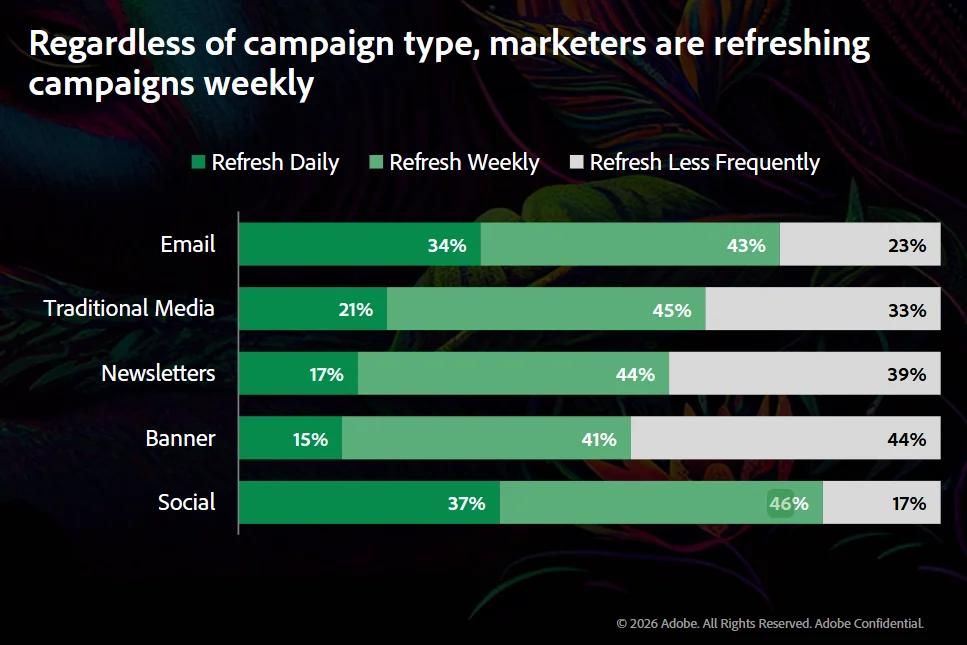
[ALT: Adobe Survey on How Often Marketers Refresh Social Campaigns]
Source: Adobe
Paid social needs a regular stream of new creative long before the old batch has completely run its course.
That is where UGC production becomes a much bigger challenge.
More creators can increase output, but output alone does not solve the problem. The real priority is producing enough fresh, usable creative to keep paid social moving.
This guide breaks down how to approach that challenge systematically and build a UGC production engine that can keep pace with paid social.
Let's get into it.
P.S. Looking for a broader introduction to UGC before we get into scaling? Our Start-To-Finish Guide On User-Generated Content gives you the full foundation in one place.
Why UGC Production Gets Harder as Paid Social Spend Grows
To start, it helps to understand what actually changes when paid social spend increases.
Higher spend puts more pressure on the creative pipeline because teams need to test more ideas while replacing losing ads faster.
Each new concept has to move through briefing, production, review, and launch quickly enough to be useful. At the same time, teams need enough creative variety to learn what actually drives performance.
Roughly 50-53% of Meta creatives are classified as losers across every spend tier. This means a large share of what gets produced will never become something the media team can scale.
Twenty versions of the same testimonial may increase output, but they still test one underlying idea.
This is where coordination starts to matter as much as UGC content creation itself.
Scaling UGC successfully requires a repeatable process for turning ideas into testable ads without slowing down the media team.
Next, we'll look at how to make that work in practice.
Begin With a Creative Testing System, Rather Than a Content Quota
Before setting a weekly video target, decide what you actually want your creative pipeline to learn.
Separate Concepts From Variations
Think of each ad as a hierarchy:
A customer testimonial, for example, might be the concept. From there, you can explore frustration, comparison, transformation, or skepticism as separate angles.
There is a performance reason to protect that level of variety. TikTok reports that campaigns with creative diversification saw a 13% higher conversion rate.
Changing the caption, opening line, or CTA gives you another variation. But changing the underlying reason someone should care creates a much more meaningful test.
That distinction helps teams spend production capacity on genuine creative diversity instead of multiplying similar assets.
Decide What You Want Each Batch to Learn
Every batch should start with a few clear questions:
- Which pain point gets the strongest response?
- Does a product demonstration beat a testimonial?
- Which creator profile connects best?
- Does an objection-led hook outperform a benefit-led opening?
Now every piece has a purpose, and the results can shape the next round of production.
Build an Always-On Creator Pipeline
Once you know what needs testing, the next question is where that creative will keep coming from.
Whether you manage creators in-house or work with a UGC marketing agency, you still need a pipeline that keeps new talent moving into production.
A creator roster is simply a list of people you can contact. A creator pipeline is an active process that keeps moving talent through:
Recruit Creators for Creative Range
For paid UGC, follower count often matters far less than how convincingly someone can sell the idea on camera.
One study of 802 Instagram campaigns and more than 1,700 influencers found that engagement does not keep rising as follower count grows. After a certain point, it can actually start to fall.
For us, that is a useful reminder that follower count alone tells you very little about a creator's suitability for paid UGC.
We would deliberately vary creator profiles by delivery style, energy, environment, expertise, and familiarity with the product category.
Keep More Creators in the Pipeline Than You Need Today
Creator capacity changes constantly. Someone who delivered three solid ads last month may miss the next deadline or struggle to produce another winning angle.
That makes a wider pipeline valuable even when current production needs are already covered.
It also explains why 91% of brands now include always-on activity in their creator programs.
By recruiting continuously, teams can rotate new talent in as performance shifts and increase output without restarting the sourcing process from zero.
Read next: Proven Ways to Collaborate with Influencers and Creators
Structure UGC Briefs for Flexible Editing
With creators ready to film, attention shifts to what they actually capture. A well-structured brief can turn a single assignment into a much deeper pool of footage for future testing and editing.
Brief the Building Blocks
Think in modules rather than one locked script. Imagine a skincare brand promoting a moisturizer. One brief could request:
- 3-5 hook directions: "My skin always feels tight by lunchtime" or "I finally found something that works under makeup."
- Core pain point or desire: Dryness, uncomfortable texture, or wanting hydrated-looking skin throughout the day.
- Product proof or demonstration: Show the texture, application, absorption, and how the skin looks afterward.
- Objections to address: Concerns around heaviness, greasiness, or layering with other products.
- Required claims: Provide the exact approved product claims and wording the creator can use.
- CTAs: Test several endings built around shopping, learning more, or trying the product.
- B-roll requirements: Product close-ups, application shots, bathroom-shelf footage, and natural lifestyle moments.
Now the editor can combine different openings, proof points, visuals, and endings into several distinct executions from the same shoot.
Capture More Raw Material Than One Finished Video Requires
Give editors more pieces to work with than a single finished ad requires.
Alongside the main take, ask creators for alternative hooks, clean product footage, reactions, demonstrations, standalone voiceovers, transitions, and several CTA versions.
That extra material has become increasingly useful as creator content moves deeper into paid media. It now makes up 44% of paid media creative assets on average.
Over time, the strongest clips become part of a creative asset library.
A demonstration that worked once can return with a different hook, while an older product shot can support a new voiceover or CTA. Each assignment keeps producing usable ad variations long after the original edit is finished.
Preserve the Creator's Natural Delivery
More structure should make production easier while keeping each creator recognizable. TikTok encourages the DIY, less polished style that naturally fits alongside user-generated content on the platform.
Standardize the brief, file requirements, approval flow, and footage you need. But leave the phrasing, pacing, personality, and small imperfections to the creator.
That balance gives editors flexibility while preserving the quality that made UGC useful for paid social in the first place.
Create a Fast Feedback Loop Between Media Buying and Production
Creative production gets much smarter when media buyers and creators work from the same feedback loop.
Track Creative-Level Signals
Media buyers already have a steady stream of clues about how each creative performs.
The production team just needs those signals translated into something actionable.
A video may grab attention immediately yet lose viewers halfway through. Another may generate plenty of clicks while struggling to convert after the landing page visit.
Looking at these signals together helps the team understand where the creative is working and where the next experiment should focus.
Turn Winners Into Creative Families
Instead of treating the winning ad as a finished answer, treat it as evidence that a certain idea deserves deeper exploration.
Before a concept proves itself, breadth gives you more useful learning. Once it wins, deeper variation becomes much more valuable.
Imagine a "skeptical customer tries the product" concept starts outperforming other tests.
The next batch could keep the same underlying tension while introducing different creators, new hooks, adjacent objections, alternative demonstrations, or fresh proof points.
Each version explores the same validated territory from a slightly different direction.
Refresh Before the Pipeline Runs Dry
This feedback loop also helps teams act earlier. When a concept starts carrying meaningful spend, its next variations can already be moving through production.
Fresh creative arrives while the original still has momentum, keeping testing active and reducing the pressure to scramble for replacements after performance starts slipping.
Build the Operational Layer That Keeps Production Moving
Without a clear operating layer, the team can easily spend its extra capacity chasing updates, approvals, and missing files.
That risk is already common across marketing teams, with 64% of marketers citing fragmented workflows as a major barrier to content production.
A central production tracker should give everyone one place to see:
- creator status and assigned concepts
- products shipped and deadlines
- footage received and revision rounds
- approval status and usage rights
- live ads and performance notes
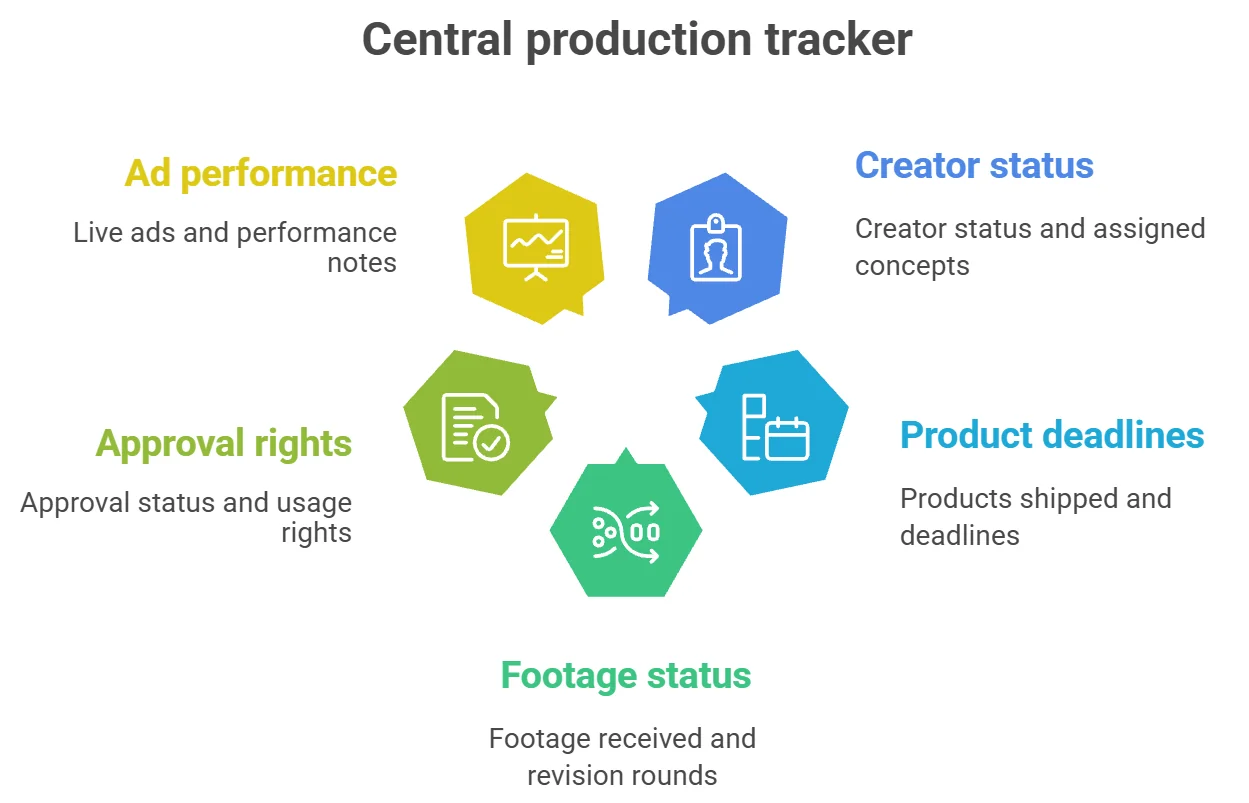
Direct ownership matters just as much. Creator communication is handled by a dedicated team member, briefs have a separate owner, claims go through approval, editors manage delivery, and performance insights feed back into the next round.
Remember: The fewer unclear handoffs you create, the easier it becomes to increase output without adding chaos.
That same discipline should extend to usage rights and compliance before production scales any further.
Handle Usage Rights and Compliance Before You Scale
As creator volume grows, informal permissions quickly become hard to manage.
Every asset should have clear usage terms attached before it enters paid campaigns, so your team knows exactly where, how, and for how long it can run.
At minimum, document:
- Paid media rights: permission to use the content in ads
- Duration: for example, 3, 6, or 12 months
- Platforms: Meta, TikTok, YouTube, or other agreed channels
- Territories: the U.S. only or multiple markets
- Editing permissions: whether you can recut footage, change hooks, or add overlays
- Whitelisting or partnership ads: permission to advertise through the creator's identity or account
- Renewal terms: pricing and process once the original term expires
- Likeness rights: how the creator's face, voice, and identity may appear in advertising
TikTok applies the same principle to Spark Ads: brands using another creator's organic post need that creator's authorization.
Compliance belongs in the same workflow. In the U.S., FTC guidance says material relationships should be clearly disclosed, while endorsements should reflect genuine experience and claims need appropriate support.
Handling these details early keeps approvals cleaner as the number of creators and live ads increases.
What a Scalable UGC Production Workflow Looks Like
Once the pieces are in place, the workflow should feel less like a series of separate tasks and more like one continuous loop.
For this example, let's take another skincare brand testing whether "works well under makeup" is a stronger angle than "keeps skin hydrated throughout the day."
The workflow could look like this:
1. Creative hypothesis: Previous ads featuring makeup application generated higher click-through rates, so the team decides to test the makeup angle directly against the hydration angle.
2. Creator assignment: Four creators receive the brief: a skincare enthusiast, a makeup-focused creator, a busy professional, and a creator known for straightforward product reviews. Each tests both angles.
3. Modular brief: Every creator records three hooks per angle, one product application, one close-up texture shot, two objection responses, supporting B-roll, and two CTA options.
4. Editing: The footage becomes 12 initial ads. For example, the team pairs the same makeup-focused hook with different creators while keeping the core message consistent, making the comparison easier to interpret.
5. Review and approval: The brand checks product claims, verifies each creator's paid usage period, confirms editing permissions, and approves the final cuts before launch.
6. Launch and analysis: After the ads collect enough spend, the team sees that the makeup angle produces a better CTR and lower CPA, while one creator's hydration video delivers the best watch time.
7. Next production batch: The next brief keeps the winning makeup angle and expands it into new territories, such as "no pilling under foundation," "morning skincare before makeup," and "makeup still looks smooth by the afternoon."
The best-performing hydration creator also receives new hooks to explore why viewers kept watching.
That final step is what turns production into a loop. Each batch gives the team information that shapes what gets filmed next, so creative volume grows alongside the quality of the testing process.
Scale UGC Around What the Data Teaches You
A bigger UGC program should create more learning, rather than simply a larger folder of videos.
That is ultimately what makes scale useful.
Fresh creators, new executions, and additional spend all become far more valuable when each round gives the team a clearer direction for the next one.
Build around that idea, and production can keep expanding without losing the curiosity that makes great creative testing work.
Frequently Asked Questions
<details class="ih-faq"><summary>How often should you refresh UGC ads?</summary><div class="ih-faq-a">Refresh timing depends on spend, audience size, and how quickly performance changes. The better approach is to keep new creative moving through production before current winners start losing efficiency.</div></details><details class="ih-faq"><summary>How many UGC creators do you need to scale production?</summary><div class="ih-faq-a">There is no fixed number. The key is maintaining enough active creators to support testing, replace unavailable talent, and introduce different delivery styles without slowing production.</div></details><details class="ih-faq"><summary>What should you test in UGC ads?</summary><div class="ih-faq-a">Start with bigger variables such as concepts, angles, hooks, creator profiles, demonstrations, and objections. Small edits matter too, but they usually produce less useful learning than testing a genuinely different idea.</div></details><details class="ih-faq"><summary>How do you scale a winning UGC ad?</summary><div class="ih-faq-a">Treat the winner as a starting point. Keep the core idea while testing new creators, hooks, proof points, objections, visuals, or CTAs around it.</div></details><details class="ih-faq"><summary>What usage rights do you need for paid UGC?</summary><div class="ih-faq-a">Define paid media rights, duration, platforms, territories, editing permissions, likeness rights, and renewal terms before the content enters paid campaigns.</div></details><script type="application/ld+json">{"@context":"https://schema.org","@type":"FAQPage","mainEntity":[{"@type":"Question","name":"How often should you refresh UGC ads?","acceptedAnswer":{"@type":"Answer","text":"Refresh timing depends on spend, audience size, and how quickly performance changes. The better approach is to keep new creative moving through production before current winners start losing efficiency."}},{"@type":"Question","name":"How many UGC creators do you need to scale production?","acceptedAnswer":{"@type":"Answer","text":"There is no fixed number. The key is maintaining enough active creators to support testing, replace unavailable talent, and introduce different delivery styles without slowing production."}},{"@type":"Question","name":"What should you test in UGC ads?","acceptedAnswer":{"@type":"Answer","text":"Start with bigger variables such as concepts, angles, hooks, creator profiles, demonstrations, and objections. Small edits matter too, but they usually produce less useful learning than testing a genuinely different idea."}},{"@type":"Question","name":"How do you scale a winning UGC ad?","acceptedAnswer":{"@type":"Answer","text":"Treat the winner as a starting point. Keep the core idea while testing new creators, hooks, proof points, objections, visuals, or CTAs around it."}},{"@type":"Question","name":"What usage rights do you need for paid UGC?","acceptedAnswer":{"@type":"Answer","text":"Define paid media rights, duration, platforms, territories, editing permissions, likeness rights, and renewal terms before the content enters paid campaigns."}}]}</script>